
How to Manage Your WordPress Clients

A lot of this overlaps with ongoing WordPress support, custom WordPress development and the structured processes that make projects easier for both you and the client.
Why client management matters
Effective client management helps keep projects organised, reduces misunderstandings and makes the working relationship much smoother. It also improves retention, referrals and the overall quality of delivery.
1. Set clear expectations from the start
Establishing expectations early makes everything easier later. Timelines, deliverables, pricing and communication methods should be agreed before the project gets moving.
- Define the scope clearly
- Set realistic timelines
- Explain what is and is not included
- Agree how updates and feedback will be handled
2. Maintain open communication
Managing WordPress clients requires frequent and honest communication. Regular updates, early warnings about delays and quick answers to reasonable questions all help keep trust high.
- Share progress consistently
- Raise blockers early
- Use clear language instead of technical overload
- Make sure clients know what happens next
This is often where structured support processes make a big difference. Clients usually feel more confident when they know how issues, updates and changes will be handled after launch as well as during delivery.
3. Implement a solid project management system
A clear project management system makes delivery more predictable. Tools like Asana, Trello or Basecamp can help organise tasks, deadlines and responsibilities in a way that both you and the client can understand.
- Organise tasks and milestones
- Track deadlines clearly
- Keep project updates in one place
- Improve visibility for everyone involved
4. Use contracts and agreements
Contracts protect both you and the client. They should clearly define the project scope, deliverables, payment terms, timelines and any relevant conditions around revisions, delays or ownership.
- Clarify deliverables
- Reduce scope confusion
- Protect both parties legally
- Create a more professional working framework
5. Provide training and documentation
Clients usually need confidence, not just access. Simple training and clear documentation help them manage blog posts, small edits and routine tasks without becoming dependent on you for everything.
- Reduce unnecessary support requests
- Help clients handle simple updates safely
- Increase trust through clarity
- Make handover feel more complete
6. Provide timely support
Prompt responses and reliable technical help are a big part of client satisfaction. Clients do not expect instant answers to everything, but they do expect consistency and clear follow-up.
- Respond quickly to important issues
- Set expectations for support response times
- Use a simple support workflow
- Be dependable when problems appear
7. Keep developing professionally
WordPress changes constantly. Themes, plugins, performance standards, SEO expectations and user needs all move over time. Ongoing learning helps you give better advice and build more useful long-term relationships.
- Stay current with WordPress changes
- Follow plugin and performance trends
- Improve how you scope and deliver projects
- Bring stronger recommendations to clients
That ongoing development also improves the technical side of your work. Better knowledge of custom development, technical SEO and maintenance best practices usually leads to smoother projects and better client outcomes.
What strong client management actually leads to
When expectations, communication and support are handled properly, the benefits are bigger than just a smoother project.
- Fewer misunderstandings
- Better delivery quality
- Stronger trust and retention
- More referrals and repeat work
- A more sustainable WordPress business
Conclusion
Managing WordPress clients well is not just an admin skill. It is a business skill that directly affects project quality, reputation and long-term growth. Strong relationships are usually built through clarity, reliability and systems that make the work easier for everyone involved.
Need help building a better support and delivery process around your WordPress projects?
Get in touch and I can help you think through the technical, support and workflow side of running WordPress projects more effectively. The most relevant starting points are usually ongoing support, custom WordPress development and technical SEO foundations.
Keep exploring
Recent work
All case studies
LoftPlan
A long-term WordPress care and support project for LoftPlan, covering managed hosting, updates, SEO improvements and technical troubleshooting to keep the site reliable and commercially effective.
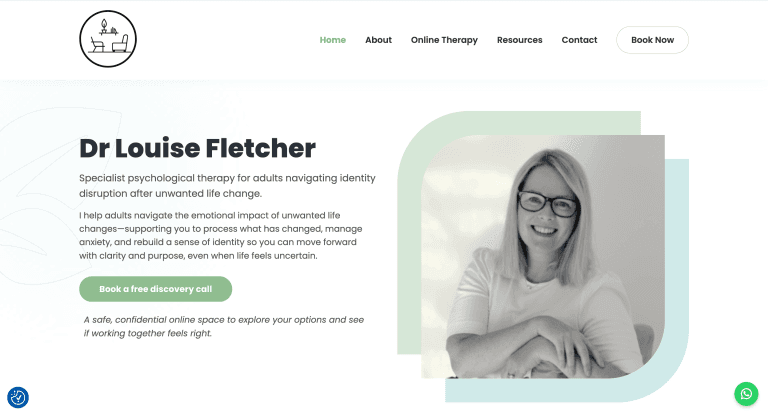
Dr Louise Fletcher
A WordPress improvement project for Dr Louise Fletcher, combining content refinement, technical SEO, analytics setup and ongoing care plan support.
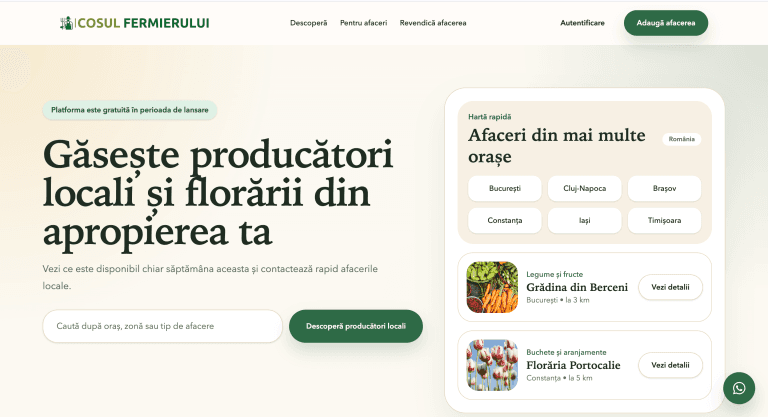
Farmer’s Basket
Coșul Fermierului is a Romanian marketplace platform helping local producers and florists manage listings, generate inquiries and grow visibility through a trust-first discovery experience.
Services
All servicesReading
All articles20 mistakes clients make using WordPress
Many WordPress websites underperform because of avoidable issues like poor hosting, missed updates, weak SEO structure a
Custom WordPress Development vs Page Builders: What Actually Scales in 2026
Page builders are useful for speed, but custom WordPress development usually scales better when performance, SEO, consis
Why I Switched to Kinsta Hosting: A Game-Changer for My Business
Switching hosting providers can have a bigger impact than most WordPress site owners expect, improving speed, support, s